
Trend Hunter Auto Strategy
Trend Hunter Auto Strategy is a fully automated trading strategy built for NinjaTrader 8, designed to leverage the custom indicator TrendHunterV1 to identify trend-based long and short setups. Whether you’re an algorithmic trading enthusiast or just looking to automate your edge, this strategy offers robust execution flexibility — including traditional stop/target-based management or ATM Strategy integration.
Let’s walk through exactly how it works.
🧠 How the Strategy Works
🎯 Core Logic: The TrendHunter Signal Engine
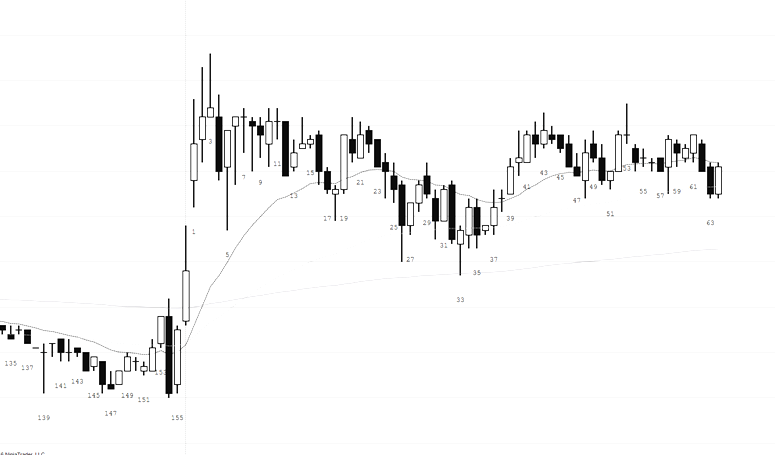
At its heart, TrendHunterAuto relies on a custom indicator called TrendHunterV1, which generates directional signals:
-
+1→ Long signal -
-1→ Short signal -
0→ Neutral / no signal
Every time a new bar is formed, the strategy checks the SignalDirection value from the indicator:
-
If a new signal appears (i.e., different from the previous bar), the system arms the signal and saves the timestamp of when it appeared.
-
The strategy waits until a valid session time (based on two user-defined trading windows) to act on the signal.
-
Once confirmed, it triggers a trade in the direction of the signal — either Long or Short — depending on the selected execution method (ATM or classic stop/target).
Create a free account or login to unlock this download.
⏰ Time Filters: Trading Only When It Matters
You define two separate time windows for trading:
-
Morning: e.g., 9:30 AM to 11:30 AM
-
Afternoon: e.g., 2:00 PM to 3:45 PM
The strategy will only enter trades if the signal first appeared during one of these periods. This prevents entries from being triggered outside your active trading hours — especially useful for avoiding overnight or low-liquidity setups.
⚙️ Two Execution Modes: ATM vs Classic Trade Management
✅ Option 1: Classic Stop Loss and Profit Target
If UseATM is set to false, the strategy uses NinjaTrader’s built-in trade management via:
-
SetStopLoss(CalculationMode.Ticks, StopLossTicks) -
SetProfitTarget(CalculationMode.Ticks, ProfitTargetTicks)
This means:
-
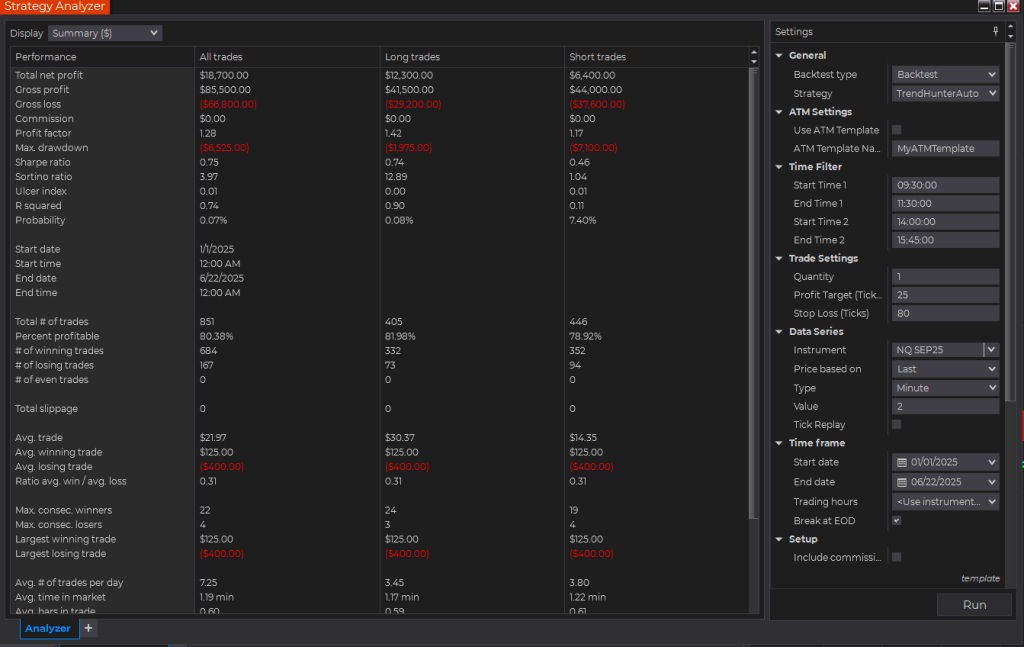
When a signal fires, the system enters at market with your defined stop and target in ticks (e.g., 80-tick stop, 25-tick target).
-
No custom ATM logic is involved — this is straightforward and reliable for backtesting and consistent execution.
📊 Pros:
-
Great for backtesting and historical performance tracking.
-
Simple to manage and configure.
-
Fully contained inside the strategy.
⚠️ Cons:
-
Less flexible.
-
Cannot trail stops, auto-breakeven, or use advanced scaling logic.
✅ Option 2: ATM Strategy Execution (Advanced Trade Management)
If UseATM is set to true, the strategy will:
-
Launch an ATM template by name (set in
AtmTemplateName) -
Use that template’s pre-configured settings for stop, target, trailing logic, auto breakeven, etc.
-
Wait until the previous ATM strategy is completely flat before entering a new one.
📊 Pros:
-
Use NinjaTrader’s full ATM management tools: auto-breakeven, trailing stops, multiple targets.
-
Seamless integration with DOM/Chart Trader for visual monitoring.
-
Great for real-time discretionary control combined with automation.
⚠️ Cons:
-
Not backtestable in the Strategy Analyzer.
-
Can only run in real-time or playback.
-
Must ensure template name is correctly set and exists.
🔁 Entry Logic and Re-Arm Mechanism
One standout feature is the signal re-arm logic:
-
A signal is only acted upon once per appearance.
-
After a trade is taken, the system disarms the signal and waits for a new one.
-
If the same signal (e.g.,
+1) persists bar after bar, no repeated entries occur. -
This prevents signal spamming and overtrading.
🎛️ Fully Customizable Parameters
You can adjust the following from the NinjaTrader Strategy menu:
| Parameter | Description |
|---|---|
UseATM |
Enable ATM mode or classic trade logic |
AtmTemplateName |
Name of your saved ATM strategy |
Quantity |
Number of contracts per trade |
ProfitTargetTicks |
Used when ATM is disabled |
StopLossTicks |
Used when ATM is disabled |
StartTime1 / EndTime1 |
First session window |
StartTime2 / EndTime2 |
Second session window |
🖥️ Visual Chart Integration
Upon startup, the strategy loads the TrendHunterV1 indicator directly onto your chart. This gives you:
-
Visual confirmation of entries.
-
Real-time coloring and signal arrows.
-
A clickable Discord link if included in the indicator.
🧪 Backtesting and Live Deployment
| Mode | Execution Type | Backtest-Compatible |
|---|---|---|
| Classic | Stop/Target logic | ✅ Yes |
| ATM Mode | ATM Templates | ❌ No (real-time only) |
Tip: Use Classic Mode for testing performance and ATM Mode when you go live with real money.
🧩 Final Thoughts
The TrendHunterAuto strategy brings powerful automation to your NinjaTrader workflow. Whether you prefer the simplicity of fixed stops/targets or the flexibility of ATM templates, it adapts to your trading style with confidence.
This setup is ideal for:
-
Trend-following traders looking to automate their setups
-
Hybrid traders who want ATM control with signal-based entries
-
Advanced users managing multiple time windows and custom indicators
✅ Build confidence through structured entries
✅ Stay disciplined with automated management
✅ Maintain control with ATM logic when needed
Ready to automate your edge?
Start using TrendHunterAuto today and experience hands-free trend execution that respects your strategy, your timing, and your risk.