
Trading Levels PTZ v2 for TradingView
Trading Levels PTZ v2 for TradingView
Paste Your Daily NQ & ES Levels Directly onto Your Chart — Zones, Alerts & Bull/Bear Case Included
Trading Levels PTZ v2 | PropTraderz is a TradingView Pine Script indicator built for NQ and ES futures traders who follow a structured daily plan. Instead of drawing levels manually every morning, you paste one line of text into the Settings and every level, zone, and trade idea appears instantly on your chart — colored, labeled, and ready to trade.
The indicator was built specifically to work with the PropTraderz Daily NQ Plan. Every plan includes a one-click Copy Formatted Levels button — paste the result into the indicator and your chart is ready in seconds.
Trading Levels PTZ v2
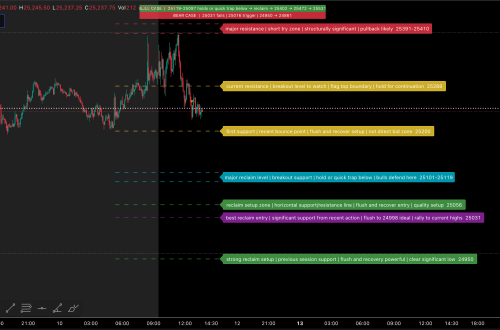
Paste NQ/ES daily levels from the PropTraderz plan — lines, zones (filled rectangles), Bull/Bear Case top bar, approach warnings, and alerts — all auto-drawn on your chart.
What Is Trading Levels PTZ v2?
Trading Levels PTZ v2 is a chart overlay designed to eliminate the manual work of plotting your levels every day. You get the PropTraderz daily NQ plan, click Copy Formatted Levels, open the indicator Settings, and paste. Done — your support levels, resistance levels, pivot zones, trade ideas, and key confirmations are all on the chart.
It supports three input sections: Trade Ideas (main levels), Support & Resistance (background structure), and ES Levels (for correlation traders). Each section is independent and can be toggled on or off.
Key Features
- Paste-to-chart levels — one-line CSV format draws all lines and zones instantly
- Zone support — two prices in one entry create a filled colored rectangle (Bull Pivot, Bear Pivot zones)
- Bull / Bear Case top bar — shows your directional bias text at the top of the chart (configurable position and size)
- Approach Warning box — when price is within X points of any level, a red warning appears top-right on the chart (always on, independent of alert mode)
- Key Level alerts — mark any level with
*to trigger special alerts only for that level - Three alert modes — Off, All-Levels, or Key Levels Only — both on-approach and on-cross
- ES Levels tab — plot ES futures levels alongside NQ for correlation setups
- Fully customizable — label size, offset, background opacity, line length, dashed left-side line
- Supports 15 colors — aqua, red, orange, yellow, lime, fuchsia, white, gray, teal, and more
- Line styles — solid, dashed, dotted, or zone (filled box)
How to Use It
- Add Trading Levels PTZ v2 to your NQ or ES chart on TradingView
- Open the PropTraderz daily NQ plan on proptraderz.com
- Click the orange 📋 Copy Formatted Levels for TradingView button
- Open the indicator Settings → paste into the Input Levels (Trade Ideas) field
- Click OK — all levels appear on your chart automatically
For the Bull/Bear Case bar: type your directional bias in Settings → Top Bar → Bull Case / Bear Case fields. It will appear as a small text overlay at the top of the chart.
Level Format — How It Works
Each level follows this simple CSV format:
NQ,color,style,size,label,price;
NQ,aqua,solid,-2,Long 29550,29550;
NQ,red,dashed,-2,Short 29650,29650;
NQ,yellow,zone,-2,Bear Pivot,29526,29550;
NQ,aqua,solid,-2,*Key Support,29426;NQorES— instrument filter (only draws on matching charts)color— aqua, red, orange, yellow, lime, fuchsia, white, graystyle— solid, dashed, dotted, zonesize— line width (-1 to -4)label— text shown on chart (add*prefix for key level alerts)price— one price for lines, two prices for zones
The PropTraderz daily plan button generates this format automatically — you never need to write it manually.
Approach Warning & Alerts
The Approach Warning is always active. When price comes within the configured distance (default: 5 pts) of any level, a red warning box appears in the top-right corner of the chart. It shows which level is being approached. This is separate from TradingView notification alerts.
For push notifications and pop-up alerts, set the Alert Mode in Settings:
- Off — no TradingView alerts (approach warning still works)
- All-Levels — alerts fire for every level in your list
- Key Levels Only — alerts only for levels marked with
*
You can alert on approach, on cross, or both.
Who Is This For?
Trading Levels PTZ v2 is built for NQ and ES futures traders who:
- Follow a structured daily plan with pre-defined support and resistance levels
- Want to plot multiple levels and zones quickly without manual drawing
- Trade prop firm evaluations and need clean, organized charts
- Follow the PropTraderz free daily NQ plan
It is not a signal generator or strategy indicator. It is a level visualization tool — it shows where your levels are, warns you when price approaches, and alerts you when it crosses. You make the trading decisions.
More from PropTraderz
proptraderz.com — NQ & ES Futures Trading