
Volume Delta Box
Volume Delta Boxes
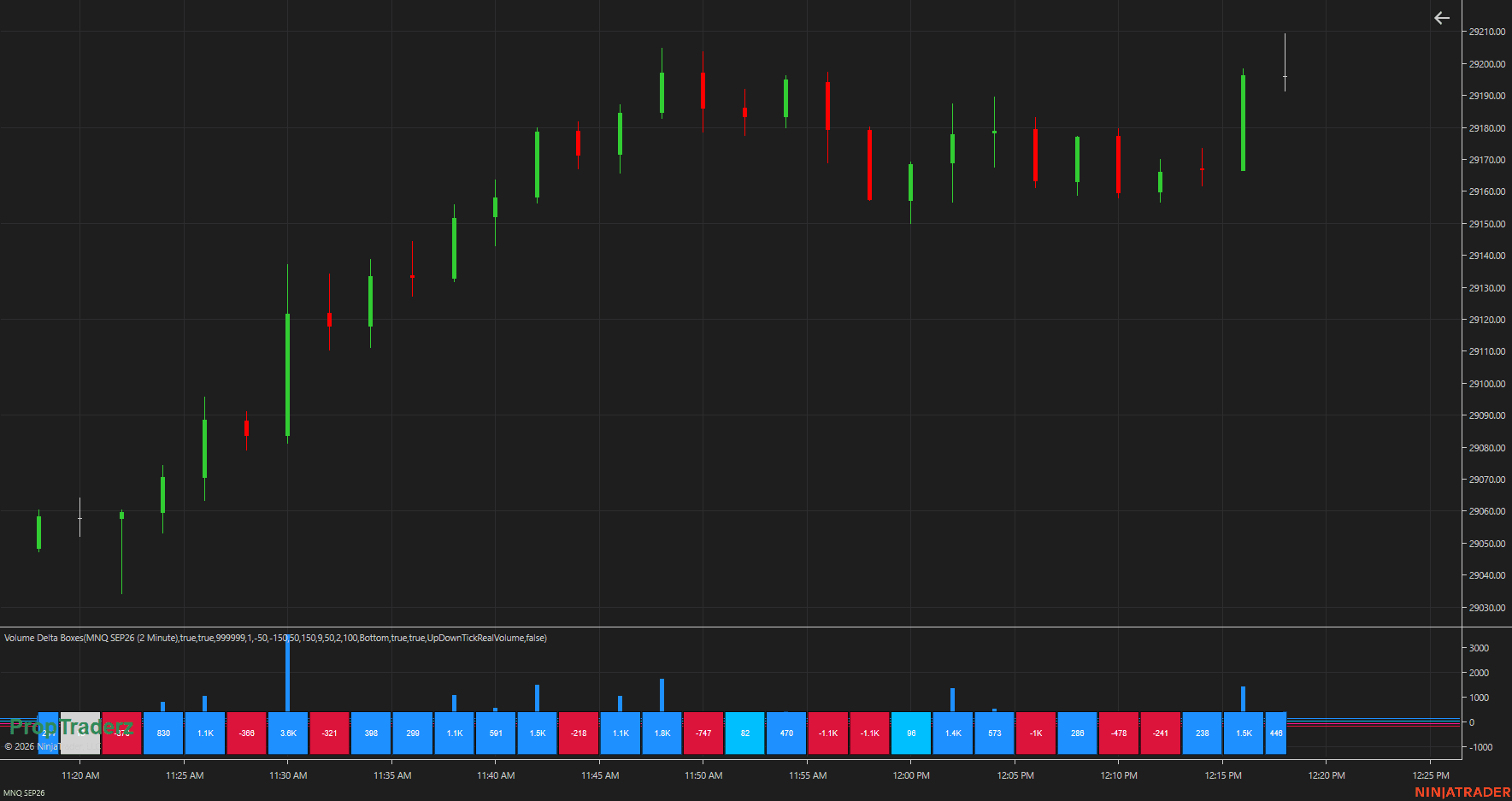
Color-coded delta for every candle — buying pressure, selling pressure, and order flow strength at a glance.
Create a free account or login to unlock this download.
What Is Volume Delta?
Volume Delta measures the difference between buying and selling volume:
Volume Delta can confirm price movement, identify weak participation, filter trading signals, and reveal situations where price and order flow disagree.
Main Features
Color-coded delta box for every individual candle
No Tick Replay required — works on historical and real-time data
Seven customizable delta strength categories with individual colors
Three calculation modes: UpDownTick RealVolume, UnitVolume, BidAsk
Optional traditional Volume Delta bar plot in a separate panel
Optional volume filtering by minimum and maximum trade size
Validated against NinjaTrader’s native Order Flow tools
Ribbon height, spacing, opacity, font size, and position fully customizable
Three Delta Calculation Modes
UpDownTick RealVolume
Uptick = buying, downtick = selling, same price retains previous direction. Uses real trade volume. Works on historical and real-time data without Tick Replay via an internal secondary tick series. Best for futures and stocks.
Measures activity by tick count instead of real volume. Each uptick adds one buying unit, each downtick one selling unit. Useful for CFDs, indices, or forex feeds where centralized real volume is unavailable.
Classifies live trades using the current Bid and Ask. Trades at or above Ask = buying; at or below Bid = selling. Historical BidAsk delta requires historical Bid/Ask tick data from the provider. Falls back to Up/Down Tick when unavailable.
Custom Delta Strength Thresholds
Seven strength categories, each with its own customizable color and threshold. Defaults shown below — adjust based on instrument and timeframe.
above +150
+50 to +150
0 to +50
near zero
−50 to 0
−150 to −50
below −150
Thresholds for MNQ will differ significantly from NQ, ES, CL, or individual stocks. Adjust after observing normal delta distribution for your instrument.
Suggested Initial Settings — MNQ / NQ
Installation
Download the indicator package above.
Open NinjaTrader 8.
Go to Tools → Import → NinjaScript Add-On.
Select the downloaded ZIP file.
Open or reload a chart, then open the Indicators window.
Find the PropTraderz category → select Volume Delta Boxes.
Configure the calculation mode, thresholds, ribbon, and colors. Click Apply or OK.
Tick Replay does not need to be enabled when using UpDownTick RealVolume. Historical tick data must still be available from your data provider.
Volume Delta Boxes is provided free of charge by PropTraderz and is not intended for resale.
More from PropTraderz
proptraderz.com — NQ & ES Futures Trading