
ICT Kill Zones and Pivots
NinjaTrader 8 — Free Indicator
ICT Killzones & Pivots TFO
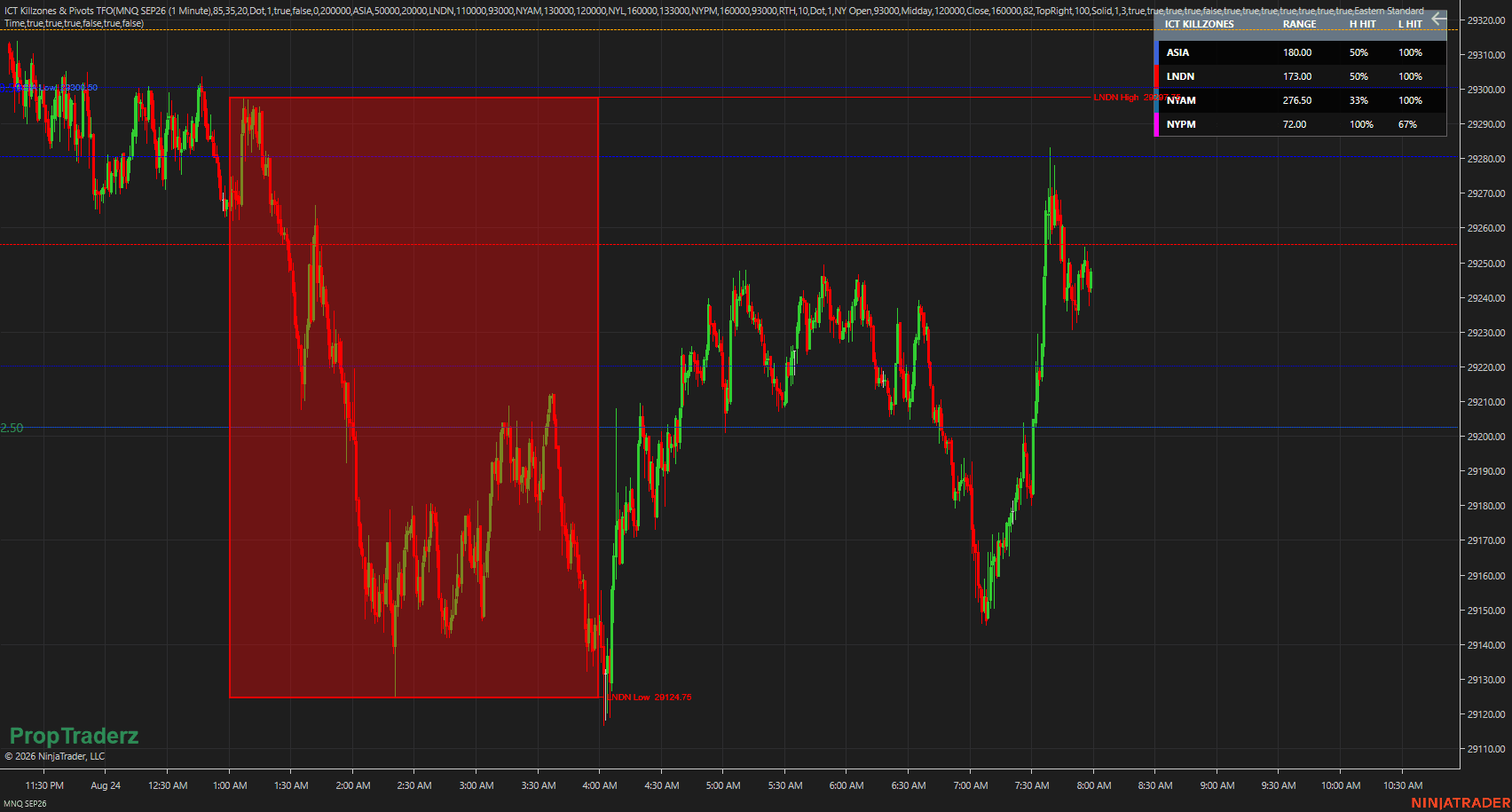
Session ranges, killzones, liquidity levels, and higher-timeframe pivots — all on one chart.
Create a free account or login to unlock this download.
Main Features
🕐
Asia, London, New York AM, Lunch, and PM sessions
Asia, London, New York AM, Lunch, and PM sessions
🎯
Up to six fully customizable killzones
Up to six fully customizable killzones
📦
Session boxes with adjustable opacity, High/Low, and labels
Session boxes with adjustable opacity, High/Low, and labels
➕
Optional session midpoints and levels extended until mitigation
Optional session midpoints and levels extended until mitigation
📅
Previous Day, Week, and Month High / Low / Midpoint
Previous Day, Week, and Month High / Low / Midpoint
🔔
New York Open, Midday, and Close reference levels
New York Open, Midday, and Close reference levels
⏱
Configurable vertical time markers
Configurable vertical time markers
🌐
New York time zone with automatic daylight-saving adjustment
New York time zone with automatic daylight-saving adjustment
📊
Session range and High/Low statistics panel
Session range and High/Low statistics panel
💧
Optional PropTraderz watermark
Optional PropTraderz watermark
Fully Customizable Information Panel
The panel can be placed in nine chart locations and its size and background opacity can be adjusted from the indicator settings.
Top Left
Top Center
Top Right
Center Left
Center
Center Right
Bottom Left
Bottom Center
Bottom Right
Customizable Killzones
Every trading session can be configured individually:
- Enable or disable the session
- Change its name and set custom start / end times
- Select color, adjust box and border opacity
- Change line style and width
- Show or hide labels and price values
- Control how levels behave after mitigation
Installation
1
Download the indicator package from the button above.
Download the indicator package from the button above.
2
Open NinjaTrader 8.
Open NinjaTrader 8.
3
Go to Tools → Import → NinjaScript Add-On.
Go to Tools → Import → NinjaScript Add-On.
4
Select the downloaded ZIP file.
Select the downloaded ZIP file.
5
Open a chart, then open the Indicators window.
Open a chart, then open the Indicators window.
6
Locate the PropTraderz category → select ICT Killzones & Pivots TFO.
Locate the PropTraderz category → select ICT Killzones & Pivots TFO.
The indicator is provided free of charge by PropTraderz and is not intended for resale.
More from PropTraderz
proptraderz.com — NQ & ES Futures Trading