-
Scalping Futures with – EMA Crossover Strategy
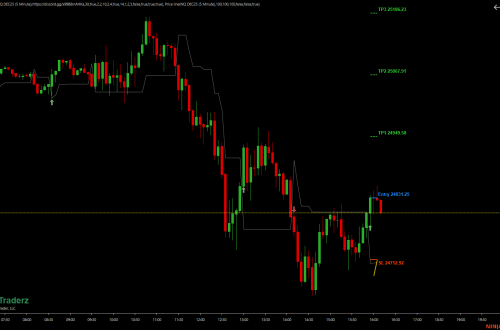
Scalping Futures with EMA Crossover Strategy Here are a few easy strategies to scalp futures for a few ticks or points (EMA) Crossover strategy The EMA crossover strategy involves using two EMAs to identify short-term trends in the market. EMA’S values can be changed on your preference ( see addon properties after downloading and adding in NT8) The “Channel SSL” (Secure Sockets Layer) is a technical analysis tool that is used to identify trends and potential trading opportunities in the market. It is a type of channel indicator that consists of two lines, one line above the price and one line below the price, which form a channel. The Channel…
-
Futures Trading for Beginners using Prop Firms
Futures Trading for Beginners using Prop Firms Prop firms, also known as proprietary trading firms, are companies that provide traders with capital and technology to trade the markets. These firms offer a great opportunity for beginners to get started in futures trading, as they provide the necessary resources and funds to help traders succeed. How Prop Firms Work Prop firms typically provide traders with access to trading capital and advanced trading technology, including charting software and trading platforms. In exchange, the prop firm takes a percentage of the trader’s profits, which is known as a “performance fee.” One of the benefits of using a prop firm is that traders have…
-
CONNECTION SET UP
Follow on Discord Step 1: Rithmic rTrader Pro Settings Download and install our Rithmic rTrader Pro on this link. This setup work on any prop not only on Apex Open your rTrader Pro application Click “Skip Settings” (top right corner) Leave selective mode turned OFF Copy and paste your Rithmic ID and password without any accidental spaces (Your Rithmic ID and password as well as your NinjaTrader License key are stored in your dashboard Choose System: APEX Choose Gateway: Chicago Area Leave market data OFF Click LOGIN and sign the 2 agreements for ALL NEW USERS upon the first login in rTrader Pro. They are mandatory (select NON-PROFESSIONAL) Step 2: DON’T EVEN TRY to set…
-
Multiseries Levels
Multiseries Levels Indicator for NT8 This addon will plot on your chart different levels such as weekly, hourly, 15 min, etc low/highs. You will find in the indicators properties link about how to use it directly from his creator here. You will find the indicator after you import it in NT8 in the indicators list in the file named TradeSaber(the name of his creator) This addon will plot on your chart different levels such as weekly, hourly, 15 min, etc low/highs. You will find in the indicators properties link about how to use it directly from his creator here.
-
Getting Funded as a Prop Trader: Why Choose a Prop Firm over a Self-Funded Account
GETTING FUNDED AS A PROP TRADER: WHY CHOOSE A PROP FIRM OVER A SELF-FUNDED ACCOUNT Getting funded as a trader can be challenging, but it’s a crucial step in reaching your financial goals. There are two main options for getting funded – using a prop firm or self-funding. In this post, we’ll explore the advantages of using a prop firm over self-funding, and how to get funded through a prop firm. Why choose a prop firm instead of self-funding? 1. Reduced risk: Prop firms typically provide traders with a portion of the capital needed to trade. This reduces the amount of money that the trader needs to put at risk,…
-
ICT FVG(fair value gap) & Pat Toolbar
ICT FVG(fair value gap) & Pat Toolbar Free Discord for more indicators or talks about trading, indicators, funding companies, etc HERE This is a simple addon that allows you to place in the ninja upper bar the drawing tools u need fast and also plots labeled lines volume profile etc Simple implementation of The Inner Circle Trader’s (ICT – http://theinnercircletrader.com) Fair Value Gap (FVG). The indicator has the following parameters: Max Lookback Bars This is the maximum number of prior bars to use for FVG detection. Defaults to 500. ATR Period The indicator uses the ATR to determine if there has been an impulse move. This is the number of bars to…
-
High Probability Trading
High Probability Trading “High Probability Trading Strategies: A Complete Guide to Building a Winning Trading System” by Marcel Link is a book that provides an in-depth look at how to develop and implement high-probability trading strategies. The author covers various aspects of trading, including market analysis, risk management, and psychological factors, and provides a step-by-step guide for building and testing a trading system. The book also includes several case studies and examples of real-world trading scenarios to help illustrate the concepts discussed. This book is designed for traders of all levels, from beginner to advanced, and covers a wide range of markets, including stocks, futures, and forex. The author emphasizes…
-
Chart Pattern Cheat Sheet
Chart Pattern Cheat Sheet
-
Candlesticks Fibonacci and Chart Paterns Trading Tools
Author’s Introduction: The first two chapters of Candlesticks, Fibonacci, and Chart Pattern Tools briefly set forth the psychology and philosophy of successful trading. In Chapter 3, we introduce the basic concepts of the Fibonacci analysis, candlesticks, and chart patterns. Experienced traders can skip these preliminaries and go on to Chapter 4, where we explain how to apply different trading concepts. The PHI-ellipse is discussed in Chapter 5. We show how it can be successfully applied to real-time intraday trading. Although the WINPHI program can work with intraday ASCII data as well, it is very slow. The interested trader can go to our Web site (www.fibotrader.com) and sign up for a…
-
Planned Level Visualizer
Planned Level Visualizer Planned Levels Visualizer is a little, easy-to-use, and free tool for NinjaTrader 8 used for displaying price level stripes on price charts. It is aimed to help any discretionary trader to save some time that is usually being spent on manual drawing stripes of levels. Example of the file text you need and how to create it watch here is very easy Here can download a text file with Es levels, remember in order to plot levels on each day you must change the date in the file every day and keep the date format you see in the file Planned Levels Visualizer is a little,…