
Prop AlgoV1
Create a free account or login to unlock this download.
🧠 PropAlgoV1 — Advanced Automated Trade Signal Engine by PropTraderz
PropAlgoV1 is a professional-grade NinjaTrader 8 indicator developed by PropTraderz to help traders identify high-probability market entries through a combination of trend confirmation, volatility filters, and adaptive SuperTrend logic.
It combines multiple classic and modern technical analysis tools into a single unified trading framework — aiming to simplify decision-making without oversimplifying market structure.
Create a free account or login to unlock this download.
⚙️ Core Concept
At its heart, PropAlgoV1 is a signal generator that synchronizes four powerful engines:
-
SuperTrend Logic – defines short-term trend direction and reversal triggers.
-
MACD Momentum – confirms momentum shifts using histogram acceleration.
-
EMA Bias (150 & 250) – identifies higher-timeframe market bias.
-
HMA Direction (55) – provides fast trend-flow confirmation.
-
Donchian Channel Trend – acts as the “main trend” filter defining breakout or breakdown structure.
This multi-layer confirmation system eliminates noise and increases the probability that each signal aligns with the prevailing market direction.
🎯 Trading Philosophy
The indicator is built on a structured risk-to-reward model, combining signal generation with automated entry, stop, and take-profit visual levels.
The goal isn’t to predict the future — it’s to define clean structure, manage risk precisely, and let the market do the work.
When a valid setup occurs:
-
The indicator automatically plots entry, stop loss, and up to three target levels (TP1, TP2, TP3).
-
Each trade idea is fully visualized on the chart with labeled price levels, so traders can act or automate accordingly.

🔍 Signal Logic Overview
PropAlgoV1 identifies two main signal types:
-
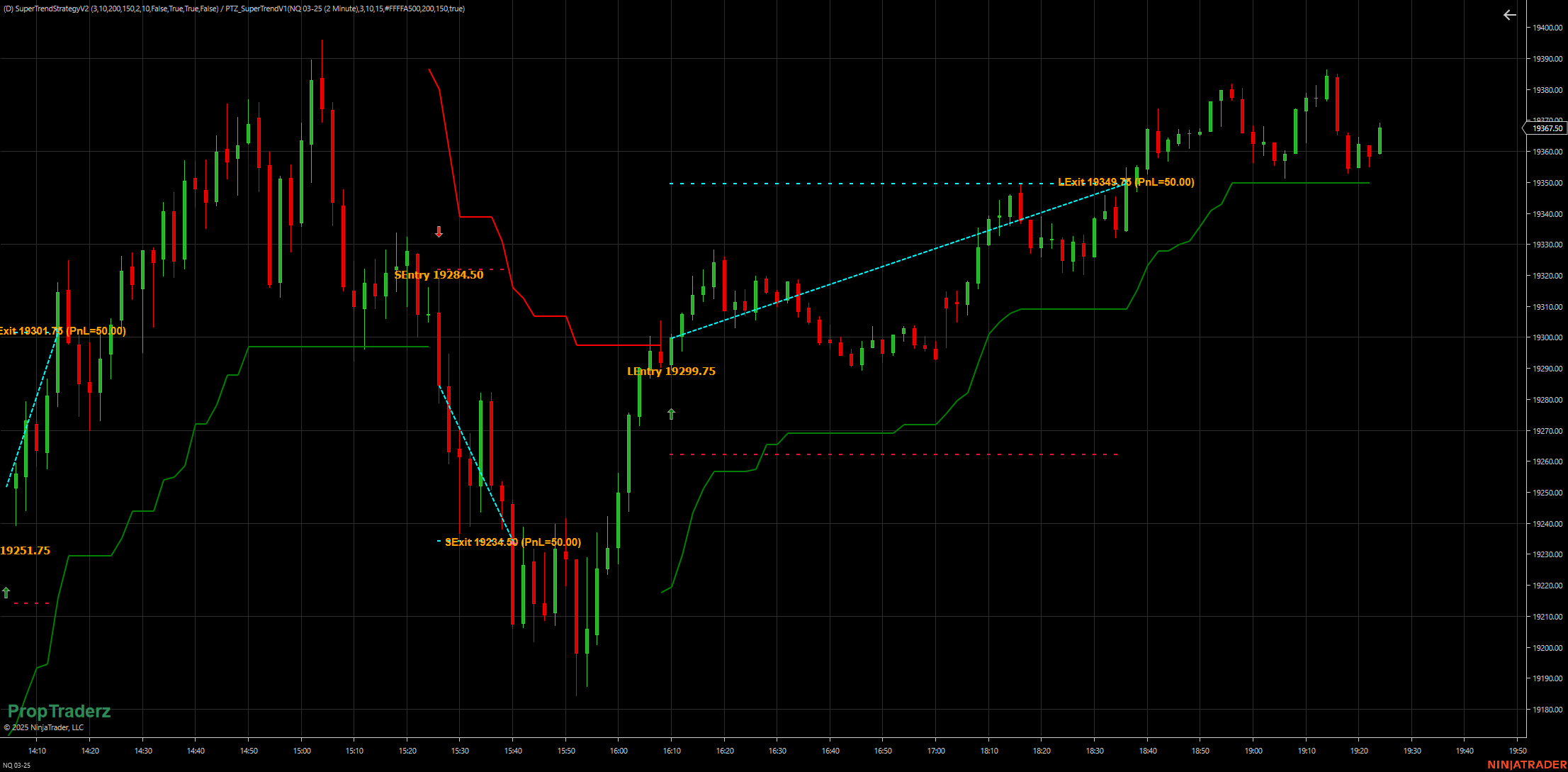
Bullish Signal (Buy) → price crosses above the SuperTrend line, supported by rising momentum (MACD), higher EMAs, and an upward HMA slope.
-
Bearish Signal (Sell) → price crosses below the SuperTrend line, supported by negative momentum, lower EMAs, and a downward HMA slope.
You can switch between:
-
All-Signals Mode (fast) – reacts quickly to every crossover.
-
Confirmed Logic Mode (slow) – triggers only when multiple filters align (MACD, EMA bias, HMA direction, Donchian trend, and optional ADX trending filter).
This flexibility allows both scalpers and swing traders to tune the system to their style.
🧮 Risk & Target Framework
Each signal generates a full risk structure:
-
Stop-Loss (SL): automatically based on ATR × SLFactor (default 2.2×).
-
Take-Profit 1–3 (TP1–TP3): calculated as multiples of the same risk distance, adjustable by multiplier.
-
Trailing Stop: adaptive ATR-based trail line that follows price action dynamically.
This provides an instant risk-to-reward map directly on the chart.
Traders can visually monitor whether a trade meets their desired R-multiple before execution.

🧭 Main Features
✅ Dual Mode Logic — choose between fast (unfiltered) and confirmed (strict) signal logic.
✅ SuperTrend Engine — customizable sensitivity (ATR factor and length).
✅ Dynamic Stop & Targets — three configurable take-profit multipliers.
✅ Visual Trade Map — all entries, stops, and targets plotted and labeled automatically.
✅ Donchian Trend Filter — helps align signals with main trend direction.
✅ ADX Filter — optional trending condition (only fire signals when ADX > 20).
✅ Custom Watermark — embedded PropTraderz branding on chart.
✅ Discord Integration — includes link to the PropTraderz community for support and updates.
🖥️ How to Use
-
Apply the indicator on your desired chart and timeframe (works best on 5-min to 1-hour).
-
Adjust Sensitivity (ATR factor) and STuner (ATR length) based on volatility.
-
Lower values = more signals, tighter SuperTrend.
-
Higher values = smoother, more selective signals.
-
-
Enable “Use Confirmed Logic” for higher accuracy filtering.
-
Check visual structure:
-
Green arrow = potential long entry.
-
Red arrow = potential short entry.
-
Blue = entry line, Orange = stop, Lime = take-profit targets, Gold = trailing line.
-
-
Use these visual levels for manual execution or as guidance within an automated strategy.
💡 Example Workflow
-
Wait for a confirmed Bull signal: price crosses above the SuperTrend and conditions align (MACD > 0, EMA150 > EMA250, HMA rising, Donchian trend positive).
-
The chart plots Entry / SL / TP1–3.
-
Trader enters the market near the entry price and manages position using plotted levels.
-
Once TP1 or TP2 is reached, trailing stop adjusts dynamically to lock profit.
Simple visual structure, strong logic foundation.
📈 Best Practices
-
Works best in directional environments — avoid using it in tight chop without trend confirmation.
-
Always confirm the signal context using volume or market profile if available.
-
Adjust SLFactor and TP multipliers to match your instrument’s volatility.
-
Combine with PropTraderz proprietary tools (like OrderFlowStats or Kalman Trend Levels) for superior confluence.
🔗 Community & Support
PropAlgoV1 is part of the PropTraderz ecosystem — a growing toolkit built for funded traders, scalpers, and discretionary pros.
Join our Discord to learn strategies, share setups, and get updates:
👉 https://discord.gg/x99B8mAHKa
⚠️ Disclaimer
PropAlgoV1 is an analytical tool designed for educational and informational purposes.
It does not guarantee profits or act as financial advice.
Trading involves substantial risk — always test on demo before going live.