• Free Indicators,  N,  Trading Blog

    Ninja Trader Lag Analyzer

    To verify if you have an issue and your Ninja Trader lagging you will need to open the Market Analyzer window in Ninja Trader, and then select NQ and  MNQ which have the biggest lag usually. Now is the time for step 1 : Step 1: Download  and install the lag analyzer add-on Open NT ⇒Tools⇒Import⇒Ninja Script Add-on Now is time for step 2 : Step 2: Right click on a space on the market analyzer window  and select Columns⇒ Double click NeuroStreet to add it, then move it up like in the picture below : Now, you will want a lag that is under 1 sec Lag Step 3…

  • Free Indicators,  S

    Super Passband Filter

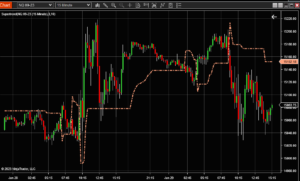
    Description The Super Passband Filter is a smoothing technique based on analogue filters. Its main purpose is to filter out unnecessary cycle data and reduce the output lag that many smoothing techniques are prone to. The smoothed and lag-reduced data is represented by the study’s main plot, SuperPassbandFilter. It is calculated as the difference of two exponential moving averages, z-transformed. Signals may be recognized using two reference plots: +RMS and -RMS, calculated as the root mean square of the main plot values. -RMS is +RMS times -1. According to this study Super Passband Filter, an entry signal can be recognized when the main plot crosses above the -RMS; crossing below…

  • Free Indicators,  N

    NT8-OrderFlow kit

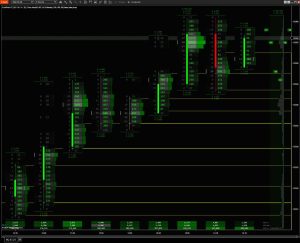
    This NT8-OrderFlow kit  is a volume analysis toolkit, it is focused on all Futures markets it is based on the Wyckoff method Description: This NT8-OrderFlow kit is a volume analysis toolkit with which you can access to the Bookmap, Order flow, Market volume, Market filter and Volume profile. I designed these tools to be used for investment funds, banks, retail traders, among other entities. With them, you will be able to detect high-frequency trading, contract volume, type-reading, inefficiencies, accumulation, manipulation and other techniques related to professional volume analysis. Many thanks to Gabriel Zenobi for releasing this as NT8-OrderFlow kit  a free version! This project is open source, my full code and…

  • Free Indicators,  T

    The Sine Wave Indicator-John Ehlers

    The Sine Wave Indicator-John Ehlers was created by John Ehlers (Cybernetic Analysis For Stocks And Futures pgs 154-155). Buy when the blue line crosses over the red line and sell when the blue line crosses under the red line. How to use The Sine Wave Indicator-John Ehlers 1. Intersections and Turning Points: A key aspect of the Sine Wave Indicator is the crossover points of these two lines. When the Sine line crosses above the Lead Sine line, it can indicate a potential bottom in the market, suggesting a bullish turn. Conversely, when the Sine line crosses below the Lead Sine line, it may indicate a potential market top, suggesting…

  • Free Indicators,  H

    Hammer Candlesticks Ninja Trader Addon

    Hammer Candlesticks Ninja Trader Addon A simple script that changes the colour of the candle if the wick is larger than the candle snippet by WeyldFalcon .​ ​​This script colours ‘Hammer/Inverted Hammer’ Bars based on percentage ratio Wicks/(High-Low). In addition, one can play sounds attached to the signal bars. Both Bar Color and Sound signals can be switched on/off by users in the indicator properties windows. KEY TAKEAWAYS Hammer candlesticks typically occur after a price decline. They have a small real body and a long lower shadow. The hammer candlestick occurs when sellers enter the market during a price decline. By the time of market close, buyers absorb selling pressure and push the…

  • Free Indicators,  N

    Ninja Trader toolbar with labeled lines

    Ninja Trader toolbar with labeled lines here a few off al features included ⇓ Fibonacci extensions and retracements OrderFlow Volume Profile Angled Line Line, ray and extended line combined Channel GanFan Trend channel tool designed for simplicity Support Line Perfectly horizontal support/resistance line Range Perfectly horizontal trend channel Measured Move Measure 2 equal legs Measure Take measurements between 2 points Arrows 4 more arrow markers with custom size Notes Predefined annotations and multilines text wrapping Standard & Third Party Drawing Tools Pin any drawing tool for quick access Plot Executions Button Plot your trade executions with markers only or text + markers Snipping Tool Button Run Windows snipping tool to…

  • Free Indicators,  M

    Market Generate Information (MGI)

    Market Generate Information (MGI) by Trinitas Trading  Many thanks to Trinitas Trading for this great free tool for Ninja Trader. In order to download must go in Trinitas website and download the tool for free Downloads This free MGI (Market Generated Information) indicator automates the process of adding useful information on your chart to help identify trading opportunities, market context and areas of interest to help guide decision making. Three indicators are offered for daily, weekly and monthly time frames. MGI Market Generate Information (MGI) is a set of key data points and metrics used by traders and analysts in Market Profile analysis. These metrics provide valuable insights into the…

  • Free Indicators,  M

    Market Structures Lite -Ninja Trader

    The Market Structures Lite -Ninja Trader indicator shows  Break Of Structures (BoS) patterns and various swing points (High-high, Low-low, High-low and Low-high). This is a light indicator not a full customized, but still make its job pretty good. After install you can find it in Ninja Trader indicators under the folder  FxStill ⇒ SmartMoney For a more advance version can take a look  HERE Enjoy!

  • C,  Free Indicators

    Clean Chart AddOn

    Clean Chart AddOn indicator it’s for you to do your analysis, again and again, and you don’t want to delete the previous analysis part. This indicator removes the text from the top of the chart and keeps it clean, it also works to clean the chart during a previous analysis, or you can keep two analyzes at the same time, you can also keep the Chart clean at the time you want to leave it blank, here I leave a small video for you to see how it is used, I hope you enjoy it utility.